Sunday, June 18, 2023

Father's Day Card, 2023

Here's the Father's Day card I made two of, one for my husband and one for my son-in-law. The pattern is from Dreaming Tree, Hippie  Bus Greeting Card

This is a darling vintage card that was so fun to make. And, my husband use to drive a VW van back in the day, so it was meaningful in this way as well. I designed the pattern on the surfboard, as well as altering the name tag to say  Hippie Father's Day.


I also designed the layout of the inside of the card. My husband really loved this card.
The pattern comes with numerous alternate wording for the front, such as Peace & Love, Hippie Birthday, Groovy Greetings, etc.

The pattern for the card also comes with a peace envelope, which is so cool!

Hippie Day, Friends!


Friday, June 16, 2023

Graduation Card - 2023

 I made a graduation card for my great niece from revised cut files from Dreaming Tree. The base of the card was a Father's Day card, but I designed the rest as I saw fit.

I used a glitter brush on black cardstock. I also placed the negative paper where the words were cut out as a stencil to place the letters and numbers onto the card.
This is called a twist & turn card (it probably has other names as well). The four panels fold into the card flat, and spring up upon opening. I made a gift card envelope for the bottom, and a sentiment card attached above the panels.

Happy Graduation!


Wednesday, May 31, 2023

Patriotic 3D Heart-Shaped Box

 The most recent make for the eCal SCAL and Create FB page. I used the heart box from Simply Crafty SVGs, and digital paper and elements from Bo Bunny. I added on the standing stars on the top, as well as the 4th of July banner.


The three graduated-sizes round elements on the front were also from Bo Bunny, and were covered with Glossy Accents. The star element on the front tab were made into three layers and lifted with foam tape.

Happy 4th to you!

Sunday, April 30, 2023

April 2023 Challenge - Travel Theme - Chibitronics

In this challenge (eCal, SCAL & Create FB page) we were asked to make something (anything) with a travel theme. We were to mat it in our eCal, SCAL or Create software (I use Create). We were to select an appropriate font, have a shaped mat or base and have an interactive component. I designed this camera card, the base of such being from Love SVG. I used a Fiskar's texture plate to make the snake texture of the black on the front.

I added a shutter that contained a photo of my travel mates and a distant cousin in Brescia, Italy. We are at the San Martino Tower in Brescia. The shutter element is a freebie from SVG Nation (look for the step-by-step tutorial on her site).


The very back of the card was designed with the outline die cut top of some of the landmarks all in black. I then did another layer print-2-cut of the image. Most of the print design is done in Affinity Photo, saved as a png file, then traced in Create. Here's the front with just the basic elements, less the shutter portion. I decided where I wanted the light (flash), and punched a small hole.

I then took the second copy of that front, placed them together and put a pencil mark in the hole to mark the place where the chibi light will be.

I next took just the back piece of the camera, the copper foil tape, the disc battery and the chibi chip.

I used the chibi site to get ideas for how to "make it go." I first applied the copper foil, the positive side on the right and the negative on the left. I left around an 8th of an inch away. The place in between the tape is where the pencil mark I made where the light will be. The chibi chip is placed there, the pointed end on top of the negative copper foil and the wider positive side touching the right copper foil.

It's time to decide where the battery will be. I placed mine so that I would be able to make a button on the front to push to make the light go on. The negative side of the battery goes down, over the end of the left copper foil. I left the right copper foil loose until I get the foam tape applied.
The foam tape is necessary to give space for the copper tape and battery. I added a second layer of foam tape around the battery, as I didn't want the foil tape to contact the positive foil.
Next I took a small square of acrylic, and adhered it to the foam tape around the battery (on three sides). Before adhering to the top edge, I adhere the tape over the top of the acrylic, then wrapped it around the bottom so that it could make direct contact from the battery. But, with the acrylic well above the battery, it won't turn the light on until I push the acrylic down onto it. If you look closely you can see the acrylic resting on my finger.
Here's the inside completed.
Please note that there are many ways to use the chibi chips. You can go to chibitronics.com and find lots of ways to map it out. Also, you can use multiple chibi lights in a given project.  Again, check out the chibi site or you tube for more ideas.

Time to take off all of the foam tape and place the 1/8" spine piece to the back of the front camera piece. This will wrap around to the front of the back piece. Then, very carefully place the front camera piece over the foam tape.

One you have it all together, you can feel where the battery well is, and this is where you'll put your circle "button," so that when pushed the light will go on.
Here's a photo of the spine edge so you can get an idea of the 1/8" spine.
Once this was done, I was able to add the inside panels, which covered the flap on the inside back of the card. The inside artwork panels were designed in Affinity Photo. The background digi paper is Carta Bella's Let's Travel. Then I added photos, ticket stubs and labels from our 1972 trip. Talk about nostalgia!
And, here's the final photo showing me pushing down the Chibi button and "flash" coming on. Very satisfying project!


Travel the World and Document It!


Thursday, April 13, 2023

Easter - 2023

Easter treats this year were easy, fun and pretty simple. I decided to make something for the entire family instead of a container of some sort for each of the boys. I knew they'd get big easter baskets with lots of candy, so I tried to go minimal on that. And, all of the things I made were items that I had been wanting to make, so this gave me the opportunity.

The first thing I made was this little crate. It comes from Dreaming Tree, named Father's Day Gift Crate. I used digital paper, the green leaves from Creative Fabrica. The little elements on the front circular emblem were also from them.


I put together these little cone cheese ball bags to simulate carrots for the crate.

Next I made some little Bunny Belly Treats Boxes. The pattern from these came from Simply Crafty SVGs. They have a little pull tab on the back where you can get into the candy cup. So cute!
You can see the little tab at the top of the belly area and the perforations in a dome shape going off of that.
It made quite a cute little gift altogether. I figured they could put some of the extra cheese balls packets in their lunches.


Lastly, I had the leftover candies from the Bunny Belly Treats Boxes and I needed to get them out of the house! So, I made this little Treat Dispenser, also made by Simply Crafty SVGs.  I put the remainder of the bag of M&M eggs inside.

And, that's it for Easter 2023. Hope you all had a wonderful holiday.

Here Comes Peter Cottontail!


Thursday, April 6, 2023

Crafting with the Grands

My grandboys are starting to get the idea that I'm the crafty one, and they look forward to doing crafts when they spend time with me. The younger one, 4 yrs. old, tells me that he wants to do "arts and projects."

Last week when the older one (8 yrs old) was spending the night, he decided he wanted to do a craft. I told him to tell me what he wanted to make, and after thinking about it he said that he wanted to make a pop-up card for his brother that had a satellite on it. Their family had just been on a vacation to Big Sur, and the subject of satellites came up and the younger brother became obsessed for the rest of the vacation. He could not stop talking about it. 

So, big brother basically designed this card. I cut the objects out on my cutting machine, and he glued them all to the card and told me what he wanted me to print. I was so impressed with his ideas. Lots of print-2-cut, pop-outs using foam tape, a wobble and one pop-up die where the blue astronaut was popped out about an inch and a half.

All of the elements in this card, except the inside satellite, and including the background night sky/stars came from Creative Fabrica.
The proud boy with the card for his brother. The large satellite inside is on a wobble.
A very happy little brother! He kept saying, "It has a satellite! I love it so much!"

So, the next time the little guy came to my house he wanted to do "arts and projects," and decided he wanted it to include a shaker with, of course, a satellite. This is what we came up with. He gets to use the glue, but is a bit heavy-handed with it. But, we made it work.
This was made with a wooden ring on top of a larger flat wooden keychain blank. Then with added acetate with an overlay of cardstock.
After he had his keychain he decided that he wanted to make one for his brother. It was decided that the theme of his brother's would be, what else for a kid, poop. So, here's what we came up with. Big brother thought it was pretty funny.
And there you have crafty time with EB (my grandma name).

It's Time for Arts and Projects!


Sunday, March 26, 2023

Shadow - Turning 6!

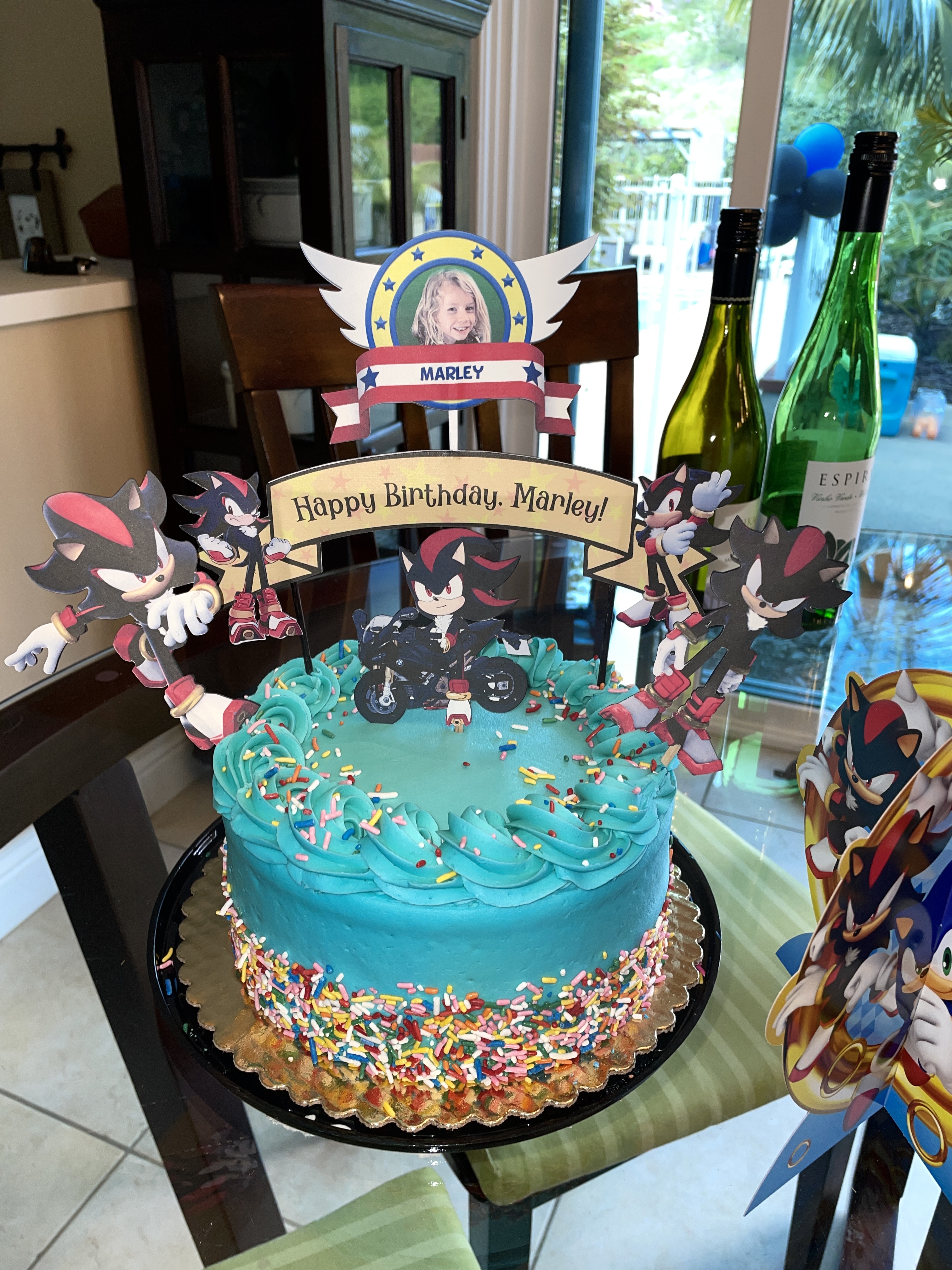
One of our favorite little friends turned six last week, and I offered to make a cake topper(s) for his birthday cake with the Sonic Shadow the Villain theme. This was really fun. He wore a Shadow costume for the entire party.

This is the cake/toppers I came up with. I bought the digital images from Etsy.


I also made this little candle box, inserting Shadow images around it. The cut file for this comes from Simply Crafty SVGs, and is very easy and fun to make. I put a t-shirt inside (see below).
This was such fun and colorful party. I added one more item to the festivities, that being a t-shirt I designed for the birthday boy. I didn't know who these characters were, so had to google them to find out what their significant quotes were. This is what I came up with.
He was wearing his Shadow garb during his entire party, but I was sent a photo the next day with him wearing his Shadow t-shirt.

Happy Birthday, Mar-boy! We love you so much!

Chaos...CONTROLLED!


Friday, March 24, 2023

Five Tags of Spring Challenge

It's spring again, even if the weather is holding onto winter. This is the last day of the Five Tags of Spring Challenge with the eCal, SCAL and Create Users Facebook page. I can't remember how many years we've done this now, but it's a fun one in which to participate. 

Tag #1:  This tag was made using images from Creative Fabrica, a large egg shape, the Egg-cited for Easter! wording image and lots of print-2-cut. 

Tag #2: This is another tag using images of a cute bunny from behind from Creative Fabrica. I designed the tag myself, adding the road, plants and sky. Then print-2-cut flowers and elements, and a part of a mini pompom for the bunny's tail.
Tag #3: I saw a similar tag on Pinterest and loved it. So I recreated every element, including the chick, from scratch. 
Tag #4: Another Pinterest inspired tag. Recreated in the Create software (version of SCAL), I made both scalloped circles using the "object-on-a-path" technique. I added the carrot to the bunny element, and did a print-2-cut with the bunny, flowers, mushroom and heart.

And  lastly, Tag #5: This last tag is just so springy! I used a flamingo image cut-2-print. Then, I took a flowered frame that really didn't match the tropical feel of the flamingo, added a bunch of hibiscus flowers all around it and backed it with whitewashed wood patterned digital paper. It made all of the difference. Then added a cute little banner to top it off. I think this might be my favorite.
And that's a wrap on another year of spring tags. If you go to our Facebook page, you can see all of the tags of the other ladies who participated. They are pretty amazing.

Happy Spring-mingo!